
ContactBook is a complete contact directory management component for Joomla 4.x, 5.x, and 6.x. It allows organizations, companies, and associations to manage a structured address book directly from their Joomla site, with a full backend administration interface and two distinct frontend views.
Each contact can store name, surname, phone, mobile, email, full address, and notes. The component includes CSV import and export, a bulk HTML email tool, and a powerful frontend search engine — all in a single free, open-source package.
⚡ Key Features
📇 Complete Contact Management
Store name, surname, phone, mobile, email, full address (street, city, state, ZIP), and free-text notes. Publish or unpublish individual contacts to control frontend visibility.
📤 CSV Import & Export
Export the entire directory to a semicolon-delimited CSV file with one click, ready for Excel. Import contacts in bulk from a CSV file — only the name field is required per row.
✉ Bulk Email (BCC)
Compose and send an HTML email to all contacts at once directly from the backend. Supports custom To and CC recipients, with all contacts automatically added as BCC using Joomla's built-in mailer.
🃏 Frontend: Contacts List
Display all published contacts as Bootstrap cards with clickable phone and email links. A dropdown lets visitors choose how many contacts to show per page: 100, 500, 1,000, 5,000, 10,000 or All.
🔍 Frontend: Contact Manager
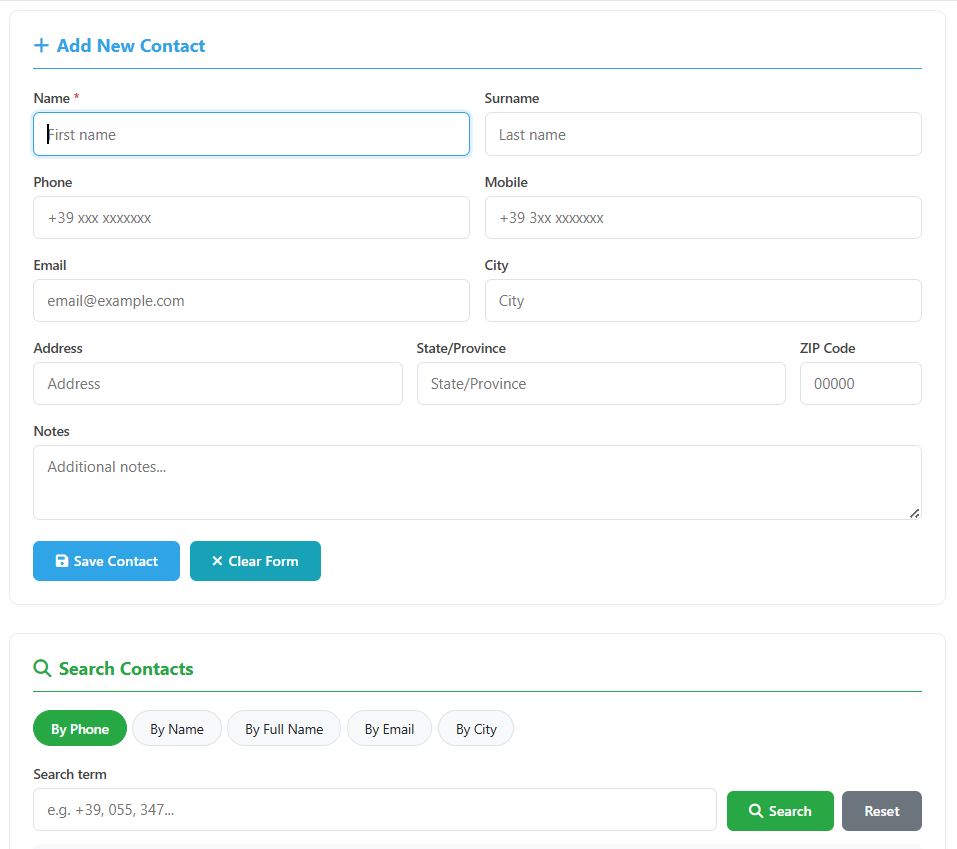
A second frontend view lets users add new contacts and search the directory by phone, name, full name, email, or city — with results displayed in a table and the matching column highlighted.
🔒 Audit Trail & Check-out
Every record tracks creation and last-modification date and author. A Joomla-native check-out system prevents two administrators from editing the same contact simultaneously.
🖥 Frontend Views
ContactBook provides two independent menu item types that you can publish separately or together:
📂 CSV Import / Export Format
The CSV file uses a semicolon (;) as delimiter and UTF-8 encoding (with BOM for Excel compatibility). The first row must be the header row:
Only name is required — all other fields are optional. Rows without a name are skipped automatically. The exported file can be re-imported directly without any modifications.
⚙ Backend Overview
Access the backend from Components → ContactBook. The toolbar gives quick access to all administrative actions:
🛠 How It Works
Install
Upload the ZIP via Joomla's Extension Manager. The database table is created automatically.
Add Contacts
Add contacts manually from the backend or import them in bulk from a CSV file.
Create Menu Items
Create one or both frontend menu items: Contacts List and/or Contact Manager.
Done
Your contact directory is live. Use the backend to manage, export, or email your contacts at any time.
✉ Bulk Email Tool
Send a single HTML email to your entire contact list in seconds, directly from the Joomla backend — no external mailing service required.
To & CC Fields
Add additional primary or carbon copy recipients by typing comma- or semicolon-separated addresses. If To is left empty, the site's configured email address is used.
Automatic BCC
All published contacts with a valid email address are automatically added as BCC recipients. A counter shows exactly how many contacts will receive the message.
HTML Editor
The message body is written using the Joomla TinyMCE editor, allowing full HTML formatting. The email is sent via Joomla's native mailer, respecting your SMTP configuration.
💻 System Requirements
Ready to Get Started?
Download ContactBook for free and have your contact directory running in minutes. Or try the live demos first.
📜 Changelog
Version 1.0.0 — January 2026
- Initial release
- Full contact management backend (add, edit, delete, publish/unpublish)
- Contact fields: name, surname, phone, mobile, email, address, city, state, ZIP, notes
- CSV export with UTF-8 BOM for Excel compatibility
- CSV import with header-based column mapping and validation
- Bulk email tool with TinyMCE HTML editor, To, CC, and automatic BCC
- Frontend Contacts List view with Bootstrap cards and per-page selector
- Frontend Contact Manager view with add-contact form and multi-type search
- Two independent Joomla menu item types
- Audit trail (created/modified date and author) and check-out system
- Language files for English and Italian (admin + site)
- Compatible with Joomla 4.x, 5.x, and 6.x
- GPL v2 or later license, JED-compliant package
Developed by Michele Bruno — FreeCMSPlugins.com
For support, contact us at